Showing posts with label Development - IDE's. Show all posts

Ultimate++


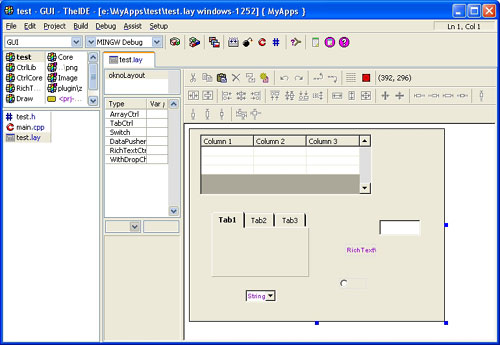
Ultimate++ is a C++ cross-platform rapid application development suite focused on programmers productivity. It includes a set of libraries (GUI, SQL, etc..), and an integrated development environment.
Rapid development is achieved by the smart and aggressive use of C++ rather than through fancy code generators. In this respect, U++ competes with popular scripting languages while preserving C/C++ runtime characteristics.

The U++ integrated development environment, TheIDE, introduces modular concepts to C++ programming. It features BLITZ-build technology to speedup C++ rebuilds up to 4 times, Visual designers for U++ libraries, Topic++ system for documenting code and creating rich text resources for applications (like help and code documentation) and Assist++ a powerful C++ code analyzer that provides features like code completion, navigation and transformation.

TheIDE can work with GCC, MinGW and Visual C++ 7.1 or 8.0 compilers (including free Visual C++ Toolkit 2003 and Visual C++ 2005 Express Editio) and contains a full featured debugger. TheIDE can also be used to develop non-U++ applications.

U++ distributions combine U++ with 3rd party tools like MinGW compiler or SDL library to provide an instant development platform.

NetBeans 6.0

The NetBeans IDE is a free, open-source Integrated Development Environment for software developers. You get all the tools you need to create professional desktop, enterprise, web and mobile applications, in Java, C/C++ and even Ruby. The IDE runs on many platforms including Windows, Linux, Mac OS X and Solaris; it is easy to install and use straight out of the box.

The 6.0 release includes significant enhancements and new features, including a completely rewritten editor infrastructure, support for additional languages, new productivity features, and a simplified installation process that allows you to easily install and configure the IDE to meet your exact needs.


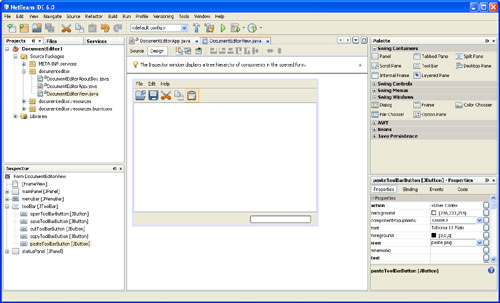
Easy to use professional Java GUI Builder
Create professional-looking Java GUIs by placing and aligning components on a canvas.
  • Professional GUI Building
  • Standard and Custom GUI Components
  • Beans Building Technology (JSR 295) Support
  • Swing Application Framework (JSR 296) support
Visual Web and Java EE development
Build standards-based web applications visually using Ajax, CSS, and JSF. Full set of tools for EJB development. Write standards-based web and enterprise applications that can be accessed with a web browser over the internet or an intranet.
  • Web and Enterprise Application Development
  • Easy Migration from Java Studio Creator
Visual Mobile Development
Create, test and debug GUI applications that run on mobile phones, set-top boxes, and PDAs
  • Visual Mobile Designer
  • Mobile Game Builder
  • Modular Build System
  • A Solution for the Device Fragmentation Issues
  • Access to Web Driven Services
  • SVG Support
  • Integrated Tools
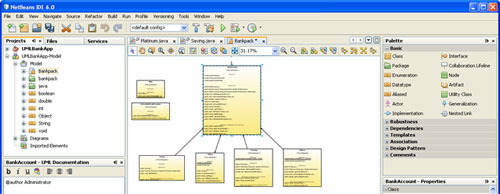
Visual UML Modeling
Separate software design from implementation with UML Modeling.
  • Forwar and Reverse Engeenering
  • UML Diagram Types
  • Customizable Code Generation
  • Integrated UML Tools


Ruby and Rails Support
Powerful Ruby editor (with code completion), debugger, and full support for Rails. Includes the JRuby runtime.
  • Ruby Projects
  • Ruby Source Code Editor
  • Ruby on Rails Projects
  • Ruby and Rails Debugger
  • Ruby Gems Installation Manager
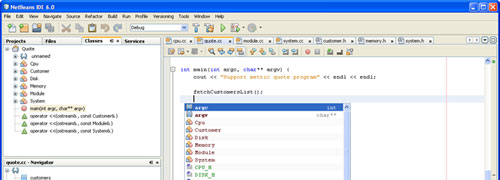
C and C++ Development
Full-featured C/C++ editor, debugger, project templates, and support for multiple project configuration. Develop professional native applications in C and C++ for a variety of platforms including Windows, Linux, Mac OS, and Solaris operating systems.
  • C/C++ Projects
  • C/C++ Templates
  • Source Code Editor
  • Integrated Debugger
  • Compiler Configurations
  • Configuration Manager
  • Makefile support
  • Class Hiearachy Browser
  • File Navigation


JDK 6 or JDK 5.0 is required for installing and running the NetBeans IDE. You can download the JDK here.
You can also download the NetBeans IDE as part of the Java EE 5 Tools Bundle.

Code::Blocks 1.0-RC2

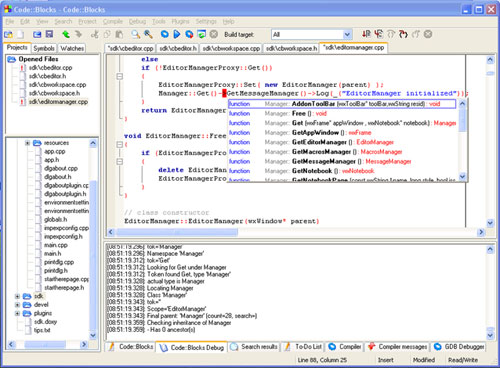
Code::Blocks is the open source, cross platform free C++ IDE, built to meet the most demanding needs of its users. It is designed to be very extensible and fully configurable.

Built around a plugin framework, Code::Blocks can be extended with plugins. It even includes a plugin wizard so you can create your own plugins. (Free SDK downloaded separately)

  • Open Source! GPL2, no hidden costs.
  • Cross-platform. Runs on Linux or Windows (uses wxWidgets).
  • Made in GNU C++. No interpreted languages or proprietary libs needed.
  • Comes in two presentations: Standalone, and MinGW bundle
  • Devpack support (optional)
  • Extensible through plugins (SDK available in the downloads section)

Compiler-related features:

  • Multiple compiler support:
    • GCC (MingW / Linux GCC)
    • MSVC++
    • Digital Mars
    • Borland C++ 5.5
    • Open Watcom
  • Compiles directly or with makefiles
  • Predefined project templates
  • Custom template support
  • Uses XML format for project files.
  • Multi-target projects
  • Workspaces support
  • Imports MSVC projects and workspaces
    (NOTE: assembly code and inter-project dependencies not supported yet)
  • Imports Dev-C++ projects
  • Integrates with GDB for debugging

Interface Features:

  • Syntax highlighting, customizable and extensible
  • Code folding for C++ and XML files.
  • Tabbed interface
  • Code completion plugin
  • Class Browser
  • Smart indent
  • One-key swap between .h and .c/.cpp files
  • Open files list for quick switching between files (optional)
  • External customizable "Tools"
  • To-do list management with different users

Bloodshed Dev-C++

Bloodshed Dev-C++ is a full-featured Integrated Development Environment (IDE) for the C/C++ programming language. It uses Mingw port of GCC (GNU Compiler Collection) as it's compiler. Dev-C++ can also be used in combination with Cygwin or any other GCC based compiler.
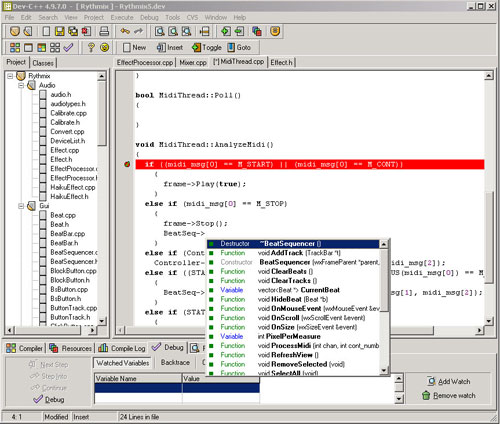


Features are :
  • Support GCC-based compilers
  • Integrated debugging (using GDB)
  • Project Manager
  • Customizable syntax highlighting editor
  • Class Browser
  • Code Completion
  • Function listing
  • Profiling support
  • Quickly create Windows, console, static libraries and DLLs
  • Support of templates for creating your own project types
  • Makefile creation
  • Edit and compile Resource files
  • Tool Manager
  • Print support
  • Find and replace facilities
  • CVS support

#Develop - The Open Source Development Environment for .NET

#develop (short for SharpDevelop) is a free and open source IDE for the C#, Visual Basic .NET (VB.NET) and Boo programming languages on Microsoft's .NET platform.
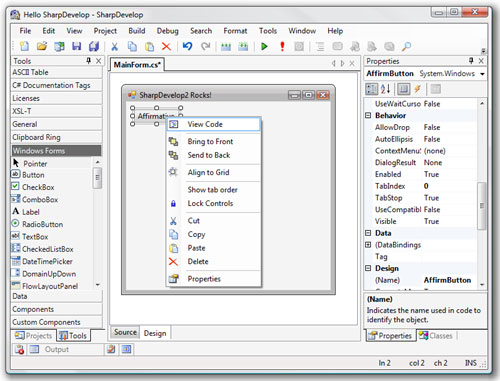
It is typically used by those who prefer not to use Microsoft's Visual Studio .NET.
It is open-source, and you can download both sourcecode and executables.

The features:

  • Forms designer for C#, VB.NET and Boo
  • Code completion for C#, VB.NET and Boo (including Ctrl+Space support)
  • Integrated NUnit support plus code coverage (NCover)
  • Integrated debugger
  • Code Analysis with FxCop
  • Refactoring support
  • Multi-framework support (.NET 1.1 and 2.0, Mono, Compact Framework)
  • XML Editing (source and tree view) with XPath search
  • Parser-based code converter (C# to VB.NET / Boo and more)
  • Compile C#, VB.NET & Boo code in the IDE out-of-the-box
  • Code AutoInsert (Alt+Ins)
  • Xml documentation preview
  • Setup projects supported with Windows Installer XML (WiX)
  • Subversion integration
  • Open source, LGPL licensed

And here are some more...

  • User interface translated to many languages
  • Write C#, ASP.NET, ADO.NET, XML, HTML code
  • Project or File-based development (Project Scout & File Scout)
  • Rich project options
  • Syntax highlighting for C#, HTML, ASP, ASP.NET, VBScript, VB.NET, XML
  • Intelligent braces
  • Folding
  • Bookmark your code
  • Code template support
  • Component Inspector
  • Feature-rich Find & Replace dialogs (including incremental search)
  • Easily extensible with external tools
  • Easily extensible with Plug-Ins
  • Re-host SharpDevelop with SDA
  • ... and much more